My homelab has three new additions: ASUS NUC 15 Pro units, each with an Intel Core Ultra 7 255H CPU. They are surprisingly capable machines, and getting proper hardware transcoding working in Plex using the built-in Intel® Arc™ 140T GPU was high on the list.
It took longer than expected to get it all sorted, but the end result is solid.
All three NUCs run Proxmox VE 9.x in a cluster. The Intel Core Ultra 7 255H has an Intel Arc iGPU based on the Arrow Lake-P architecture, with PCI device ID 8086:7d51. This is an integrated GPU sharing the same die as the CPU, which matters for how passthrough works.
What is SR-IOV and Why Use It?#
The obvious approach for GPU passthrough is to assign the entire GPU to a single VM. That works, but it creates a strict 1:1 relationship. One GPU, one VM, host loses access entirely. No display output from the NUC, no GPU for other VMs or containers, a permanent commitment of the hardware to one workload.
SR-IOV (Single Root I/O Virtualization) solves both problems. A single physical GPU presents itself as multiple independent virtual devices simultaneously. The host keeps the physical function, so display output works normally. Up to 7 additional virtual functions can be assigned to different VMs or containers at the same time, giving a total of 8 GPU devices: one for the host and seven for guests.
Each virtual function gets access to the full GPU execution engines, but time on those engines is scheduled dynamically based on demand. When only one VM is transcoding, it gets full GPU bandwidth. When multiple VMs are active, the GPU scheduler divides time between them automatically. No hard per-VF resource guarantees, closer to CPU time-sharing than static partitioning. In practice for a Plex server in a homelab this works well, since transcoding workloads are bursty rather than constant.
SR-IOV on Intel integrated GPUs is not enabled in the stock Linux driver. It requires a patched version of i915, which is what the i915-sriov-dkms project provides.
Host Setup#
The first hurdle was the BIOS. On the NUC 15 Pro, the virtualization settings are not where you would expect on a desktop board. VT-d is under Security rather than Advanced, and the Virtual Display Emulation setting (which keeps the iGPU active with no monitor connected) is under Advanced > Video. Both are required.
On the Proxmox side, three things need to be in place:
i915-sriov-dkms patches the i915 kernel driver to enable SR-IOV virtual functions. Version 2026.05.06 supports Proxmox kernel 6.17 through 7.0. Always check the releases page for the latest version and supported kernel range before upgrading the host kernel.
Kernel parameters tell i915 to claim the Arrow Lake GPU and prevent the newer
xedriver from taking it first. Theforce_probe=7d51flag targets the exact device ID,module_blacklist=xekeeps xe out, andi915.max_vfs=7sets the number of virtual functions.A systemd service loads i915 and creates the virtual functions at boot. Sysfsutils turned out to be unreliable here since i915 needs to be fully loaded before the VF count can be set, and the ordering is not guaranteed without an explicit dependency chain. The systemd service handles this cleanly.
After a reboot: eight VGA devices in lspci, one physical function on the host, seven virtual functions ready to assign.
~# lspci | grep VGA
00:02.0 VGA compatible controller: Intel Corporation Arrow Lake-P [Intel Graphics] (rev 03)
00:02.1 VGA compatible controller: Intel Corporation Arrow Lake-P [Intel Graphics] (rev 03)
00:02.2 VGA compatible controller: Intel Corporation Arrow Lake-P [Intel Graphics] (rev 03)
00:02.3 VGA compatible controller: Intel Corporation Arrow Lake-P [Intel Graphics] (rev 03)
00:02.4 VGA compatible controller: Intel Corporation Arrow Lake-P [Intel Graphics] (rev 03)
00:02.5 VGA compatible controller: Intel Corporation Arrow Lake-P [Intel Graphics] (rev 03)
00:02.6 VGA compatible controller: Intel Corporation Arrow Lake-P [Intel Graphics] (rev 03)
00:02.7 VGA compatible controller: Intel Corporation Arrow Lake-P [Intel Graphics] (rev 03)vainfo does not work on the Proxmox host itself. The physical GPU function is claimed by i915 for SR-IOV management, not media. Run vainfo inside the VM to verify the VF is working.
Proxmox Host Setup Commands#
Detailed Instructions
Perform these steps on each Proxmox host independently.
BIOS Settings#
| Location | Setting | Value |
|---|---|---|
| Security > Security Features | Intel Virtualization Technology (VT-x) | Enabled |
| Security > Security Features | Intel VT for Directed I/O (VT-d) | Enabled |
| Advanced > Video | Virtual Display Emulation | Enabled |
| Boot | Secure Boot | Disabled |
| Boot | Fast Boot | Disabled |
After saving, perform a full cold boot.
Verify IOMMU#
dmesg | grep -e "IOMMU enabled" -e "Directed I/O"Expected output:
DMAR: IOMMU enabled
DMAR: Intel(R) Virtualization Technology for Directed I/O
Install i915-sriov-dkms#
apt update && apt install -y dkms build-essential
apt install -y pve-headers-$(uname -r)

wget -O /tmp/i915-sriov-dkms.deb \
  "https://github.com/strongtz/i915-sriov-dkms/releases/download/2026.05.06/i915-sriov-dkms_2026.05.06_amd64.deb"

dpkg -i /tmp/i915-sriov-dkms.deb
dkms install i915-sriov-dkms/2026.05.06 -k $(uname -r) --force
dkms status
Configure Kernel Parameters#
Edit /etc/default/grub and set GRUB_CMDLINE_LINUX_DEFAULT to:
GRUB_CMDLINE_LINUX_DEFAULT="quiet intel_iommu=on iommu=pt i915.enable_guc=3 i915.max_vfs=7 i915.force_probe=7d51 module_blacklist=xe"Then apply:
update-grub
update-initramfs -u -k all
Create SR-IOV Boot Service#
cat > /etc/systemd/system/i915-sriov.service << 'EOF'
[Unit]
Description=Intel i915 SR-IOV VF Setup
After=systemd-modules-load.service
After=local-fs.target

[Service]
Type=oneshot
RemainAfterExit=yes
ExecStart=/sbin/modprobe i915
ExecStartPost=/bin/sh -c 'sleep 2 && echo 7 > /sys/bus/pci/devices/0000:00:02.0/sriov_numvfs'

[Install]
WantedBy=multi-user.target
EOF

systemctl enable i915-sriov
reboot
Verify After Reboot#
lspci | grep VGA | wc -l                              # Expected: 8
cat /sys/bus/pci/devices/0000:00:02.0/sriov_numvfs   # Expected: 7
lspci -nnk -s 00:02.0 | grep "driver in use"         # Expected: i915
systemctl status i915-sriov                          # Expected: active (exited)
VM Setup and the Kernel#
When creating the VM in Proxmox, a few settings are critical:
| Setting | Value | Why |
|---|---|---|
| Machine type | q35 | Required for PCIe passthrough. The default i440fx does not support PCIe, so the VF cannot be exposed to the VM |
| BIOS | OVMF (UEFI) | Required to control Secure Boot |
| Pre-Enrolled Keys | Unchecked | Disables Secure Boot. The DKMS module is unsigned and will not boot with Secure Boot enabled |
| Graphics Card | VirtIO-GPU (default also works) | Provides the VM console display independently of the passed-through VF |
| CPU type | host | Exposes the real CPU to the VM, required for the i915 driver to work correctly |
| Ballooning | Disabled | Recommended for GPU VMs. Dynamic memory reclamation can cause instability when a driver has pinned GPU memory |
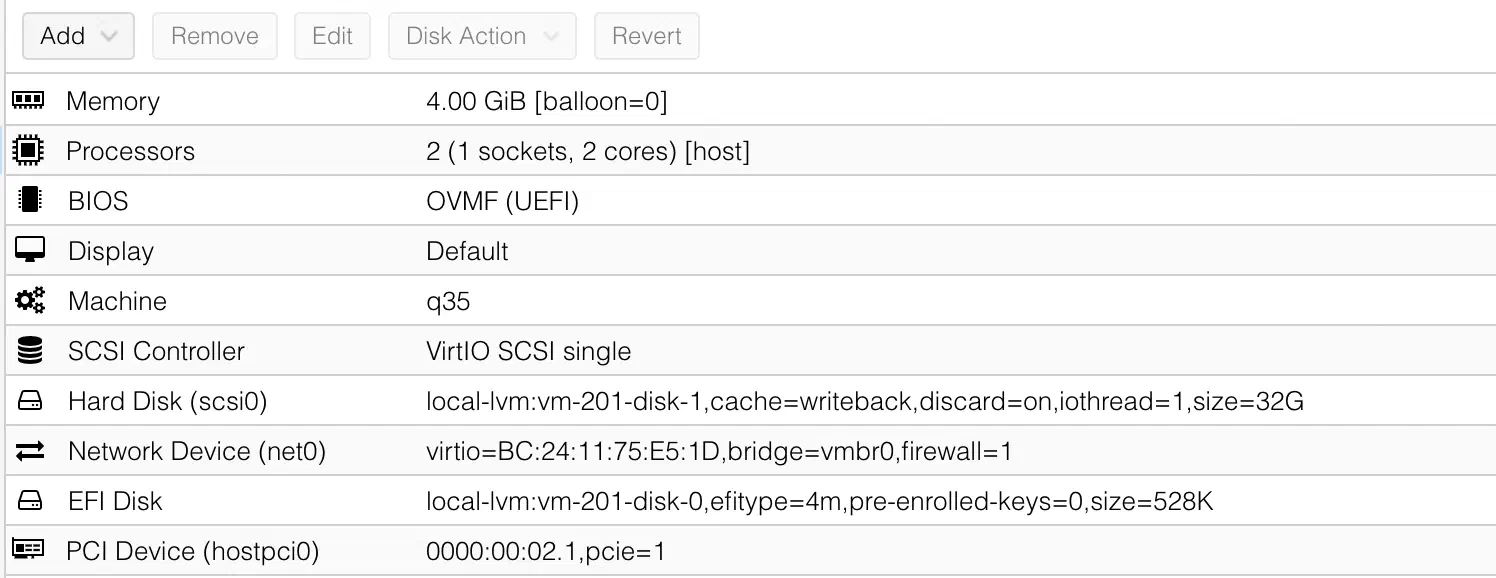
The PCI device to add is 0000:00:02.1 (or another unassigned device ID 0000:00:02.x). Never use 00:02.0, that is the physical function which must stay on the host. PCI-Express checked, All Functions and Primary GPU left unchecked.
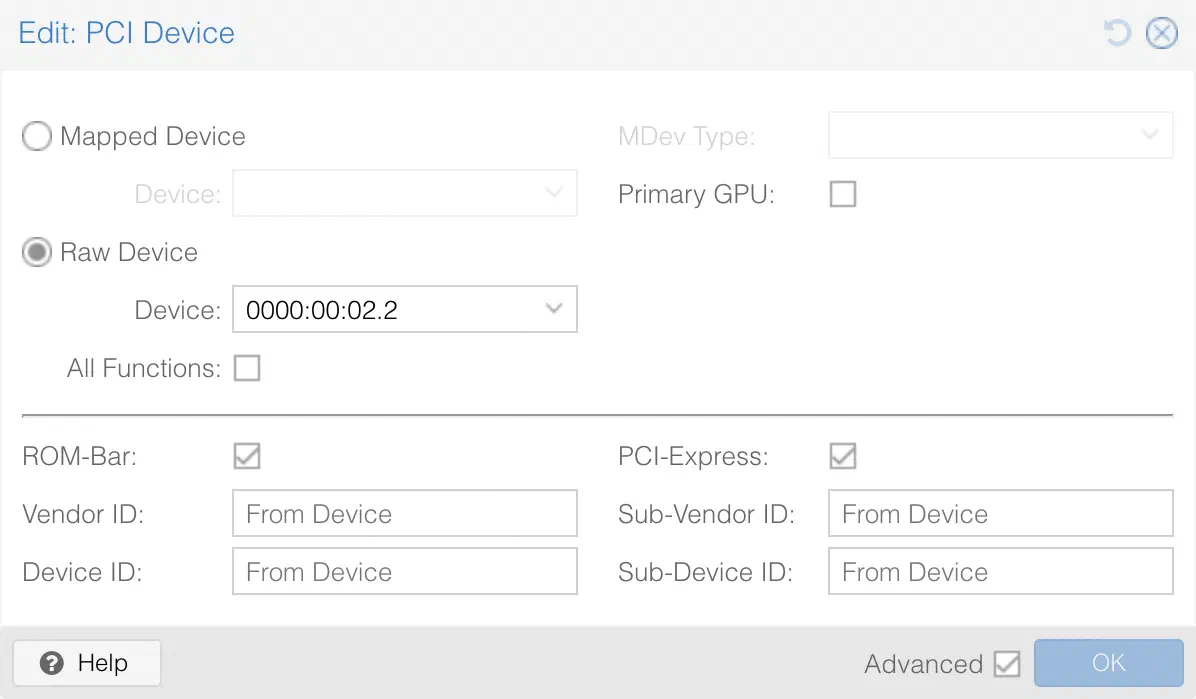
Two Ubuntu versions have been tested and confirmed working:
- Ubuntu 26.04 LTS with the stock kernel 7.0, no extra steps needed
- Ubuntu 24.04 LTS with mainline kernel 6.17 from kernel.ubuntu.com
Ubuntu 24.04’s default kernel 6.8 predates Arrow Lake SR-IOV VF support entirely, which is why the mainline kernel step is needed. Ubuntu 26.04 ships kernel 7.0 as its default and the DKMS module builds cleanly against it. An in-place upgrade from 24.04 to 26.04 is not yet available as of May 2026, so a fresh install is the only option for 26.04.
The Proxmox hosts running kernel 7.0 does not mean Ubuntu 7.0 behaves identically. The i915-sriov-dkms module targets specific kernel builds, and Ubuntu’s packaging can differ enough to cause build failures. Always verify dkms status shows the module as installed before rebooting into a new kernel.
Verification inside the VM with vainfo confirms the hardware pipeline is working:
vainfo: Driver version: Intel iHD driver for Intel(R) Gen Graphics - 26.1.2
vainfo: Supported profile and entrypoints
      VAProfileH264Main               : VAEntrypointVLD
      VAProfileH264Main               : VAEntrypointEncSlice
      VAProfileHEVCMain               : VAEntrypointVLD
      VAProfileHEVCMain               : VAEntrypointEncSlice
      VAProfileAV1Profile0            : VAEntrypointVLD
      VAProfileAV1Profile0            : VAEntrypointEncSlice
      ...
Both VLD (decode) and EncSlice (encode) entries for H264, HEVC, and AV1 confirm the full hardware pipeline is available.
Plex VM Setup Commands#
Detailed installation
These steps apply to Ubuntu 26.04. For Ubuntu 24.04, install mainline kernel 6.17 from kernel.ubuntu.com before installing i915-sriov-dkms.
Install build tools and DKMS#
sudo apt update && sudo apt upgrade -y
sudo apt install -y dkms build-essential wget gcc-14 linux-headers-$(uname -r)
Install i915-sriov-dkms#
Verify the latest version of i915-sriov-dkms and update the URL accordingly.
wget -O /tmp/i915-sriov-dkms.deb \
  "https://github.com/strongtz/i915-sriov-dkms/releases/download/2026.05.06/i915-sriov-dkms_2026.05.06_amd64.deb"
sudo dpkg -i /tmp/i915-sriov-dkms.deb
sudo dkms install i915-sriov-dkms/2026.05.06 -k $(uname -r) --force
dkms status
Configure i915 for the VF#
sudo su -
echo "options i915 force_probe=7d51" > /etc/modprobe.d/i915.conf
echo "blacklist xe" >> /etc/modprobe.d/i915.conf
update-initramfs -u
exit
sudo reboot
Verify after reboot#
uname -r
lspci -nnk | grep -A3 "01:00.0"
sudo dmesg | grep -i "sriov\|guc\|huc" | head -5
sudo vainfo --display drm --device /dev/dri/renderD128
Expected dmesg output:
i915 0000:01:00.0: Running in SR-IOV VF mode
i915 0000:01:00.0: GuC firmware PRELOADED
i915 0000:01:00.0: HuC firmware PRELOADED
Install Intel Media Stack#
The Intel GPU repository uses resolute as the apt codename, which corresponds to Ubuntu 26.04. On Ubuntu 24.04 (codename noble), replace resolite with noble in the repository URL.
wget -qO - https://repositories.intel.com/gpu/intel-graphics.key | \
  sudo gpg --dearmor -o /usr/share/keyrings/intel-graphics.gpg
echo "deb [arch=amd64 signed-by=/usr/share/keyrings/intel-graphics.gpg] \
  https://repositories.intel.com/gpu/ubuntu resolute unified" | \
  sudo tee /etc/apt/sources.list.d/intel-graphics.list
sudo apt update
sudo apt install -y vainfo intel-gpu-tools libva-drm2 libva-x11-2 \
  libva-wayland2 va-driver-all intel-media-va-driver-non-free libigdgmm12 libva2
Install Plex Media Server 1.4.3.2 beta#
Plex Pass required. Intel Arc iGPU hardware transcoding on Linux is not available in the current public release of Plex. Use the beta version below.
sudo dpkg -i plexmediaserver_1.43.2.10687-563d026ea_amd64.deb
sudo usermod -aG video plex
sudo usermod -aG render plex
sudo systemctl enable --now plexmediaserver
Set hardware device path#
sudo systemctl stop plexmediaserver
sudo sed -i 's/HardwareDevicePath=""/HardwareDevicePath="\/dev\/dri\/renderD128"/' \
  "/var/lib/plexmediaserver/Library/Application Support/Plex Media Server/Preferences.xml"
sudo systemctl start plexmediaserver
In the Plex web UI, go to Settings > Transcoder and enable both hardware acceleration options.
Plex and Hardware Transcoding#
Getting Plex to actually use the GPU was not as straightforward as expected. The VF was working, VAAPI was reporting full codec support, the plex user had access to the render device, hardware acceleration was enabled in settings. And yet Plex kept using software transcoding.
The short version: the current public release of Plex Media Server does not support Intel Arc hardware transcoding on Linux. This caught me completely off guard, since the hardware side was working perfectly and everything pointed to a configuration problem rather than a Plex limitation.
The fix is in the Plex Media Server 1.43.2.10687 beta, released on May 4, 2026 as a Plex Pass beta release.
Plex Media Server Changelog#
(Transcoding) Addressed issues hw transcoding on linux using an arrow lake igpu (PM-5197)
Installing this version gets hardware transcoding working immediately. The Plex dashboard shows (hw) next to the active transcode, indicating that hardware transcoding is being used.
To confirm hardware transcoding is actually running, check the transcoder statistics log while a stream is active:
sudo grep "transcodeHw" \
  "/var/lib/plexmediaserver/Library/Application Support/Plex Media Server/Logs/Plex Transcoder Statistics.log" | tail -3
A working setup shows transcodeHwFullPipeline="1" with both transcodeHwDecoding="vaapi" and transcodeHwEncoding="vaapi", confirming both encode and decode are running on the Intel Arc GPU through VAAPI.
This is currently a beta release requiring an active Plex Pass subscription. It is expected to reach the public release channel in a subsequent update.
Upgrading#
The DKMS module and the Proxmox kernel are coupled. Before upgrading the Proxmox kernel, check whether the current DKMS version supports it. Install headers for the new kernel and verify the module builds successfully before rebooting. The dkms status output should confirm the module is installed for the new kernel version before committing to the reboot.
The VM kernel is a separate concern. Do not upgrade the Ubuntu guest kernel through distribution channels expecting the same result as the host. Always verify dkms status after any kernel change and check the i915-sriov-dkms releases page for supported kernel ranges.
After any Plex upgrade, verify the bundled iHD driver is still present:
find /var/lib/plexmediaserver/ -name "iHD_drv_video.so" 2>/dev/nullIf hardware transcoding stops working after a Plex update, that is the first place to check.
After upgrading Proxmox VE to 7.2 (kernel 7.0.2-6-pve), the SR-IOV virtual functions stopped working. The i915-sriov-dkms module needs to be rebuilt for each new kernel version after a Proxmox upgrade.
The fix is straightforward: install the headers for the new kernel, rebuild the DKMS module verify with dkms status, then reboot.
# Install headers for the new kernel
apt install -y pve-headers-$(uname -r)

# Build DKMS module for the new kernel
dkms install i915-sriov-dkms/2026.05.06 -k $(uname -r) --force

# Verify install
dkms status

# Reboot to load the patched modules
reboot
The Result#
Three NUC hosts running Proxmox VE 9.x with kernel 7.0, i915-sriov-dkms 2026.05.06, and seven SR-IOV virtual functions each. Display output from the HDMI port works normally. Plex VMs confirmed working on both Ubuntu 24.04 with mainline kernel 6.17 and Ubuntu 26.04 with stock kernel 7.0, both running Plex Media Server 1.43.2.10687. Hardware transcoding confirmed working with a full VAAPI pipeline on all three hosts.
VMs can be migrated between hosts with Proxmox offline migration using the force flag, live migration does not work when there is a PCI device assigned to the VM. Hardware transcoding works immediately on the destination host without any reconfiguration, since all three NUCs have identical hardware.