
Same fault, three times in 48 hours#
The three-node Ceph-over-Thunderbolt cluster I wrote about in Proxmox VE and Ceph Over a Thunderbolt Ring on Three NUCs had been running clean since I finished that build. Then, over one weekend, the identical NVMe fault hit three times in 48 hours: twice on pve02, on the same physical drive both times, and once on pve03, on a different unit of the same model. Same symptom every time, same eventual fix, and a couple of things along the way I did not see coming.
graph LR
    i1["Incident 1
 pve02 · Fri Aug 7
 osd.1 down"] -- root cause found --> i2["Incident 2
 pve03 · Sat Aug 8
 osd.2 down"]
    i2 -- unnoticed until found Sun Aug 9 --> i3["Incident 3
 pve02 · Sat Aug 8
 osd.1 down"]
Nothing here is a story about Ceph failing. If anything it’s the opposite: min_size held on all three occurrences, the cluster kept serving I/O on two of three OSDs every time, and no data was lost, which is exactly what a replicated storage layer is supposed to do when a node drops out from under it. I was also extremely lucky. This is a size=3/min_size=2 pool, so it tolerates exactly one OSD down at a time. If this fault had ever landed on two nodes at once instead of staggering itself politely across a weekend, I would have been looking at a real outage. The actual story is a drive firmware bug I didn’t know I had, a fix I was half-running already for an unrelated reason, and a monitoring gap that let the third occurrence sit unnoticed for ten hours.
pve02 goes down first#
A routine Proxmox VE upgrade on pve02, the kind of change I normally don’t think twice about, triggered an NVMe controller fault on the drive backing osd.1. Kernel logs showed I/O timeouts, then the controller failing to come back from D3cold to D0, then the kernel giving up on the device entirely (Disabling device after reset failure). osd.1 dropped out of Ceph, the cluster went HEALTH_WARN with a third of its objects degraded, and stayed active the whole time on the other two OSDs.
ceph health detail, ceph osd tree, and journalctl -u ceph-osd@1 all pointed the same direction: an I/O error cascading into an abort and a superblock failure. I ran smartctl against what I thought was the failing drive, and it came back clean. That turned out to be me being stupid: the NVMe device numbering had shifted once the controller dropped off the bus, so the “clean” check was hitting the wrong device. lspci | grep -i nvme settled it properly: the drive had vanished from PCIe enumeration altogether, gone from the bus entirely. That ruled out a driver-level fix and meant only a real power cycle was going to bring it back.
As a precaution against losing a second OSD mid-incident, I live-migrated ten VMs off the ceph-vm storage pool onto NFS while I worked the problem. A full power-down of pve02 cleared the fault. On boot, the drive reappeared in lspci, ceph-volume lvm list found the original OSD metadata intact, and osd.1 rejoined on its own. Cluster back to HEALTH_OK.
pve03 goes down too, but now I know why#
The next day, the identical fault hit pve03, on the drive backing osd.2. The boot log ended abruptly right after nvme nvme1: controller is down; will reset, consistent with the system freezing rather than crashing cleanly. Same recovery: full power cycle, drive and OSD metadata intact, osd.2 rejoined, HEALTH_OK. Two other alarms surfaced the same day and turned out to be nothing: some Corosync flapping from real network congestion during heavy backfill, and slow-heartbeat warnings from OSDs genuinely busy recovering. Neither was the actual fault, both cleared on their own.
By this point the pattern was clear enough, and not in a reassuring way: two identical failures, on two different nodes, two days apart, days after I’d finished building this thing. Each node’s sole Ceph OSD disk is a 2TB Micron/Crucial CT2000P510SSD5, already on its latest available firmware (K1CR5102). This turned out to be a well-known, still-unsolved class of NVMe firmware bug: Autonomous Power State Transition (APST) lets a drive drop itself into a low-power state to save energy, and on some firmware revisions it never wakes back up, hanging the controller until the host is power-cycled. It is not specific to this drive, or this firmware. Digging into it, the identical failure signature (controller is down; will reset followed by Unable to change power state from D3cold to D0 and then Disabling device after reset failure) turned out to be all over the place: Samsung 990 Pro, Intel P4510, other NVMe models entirely, on other people’s motherboards, going back years. It’s the subject of a multi-page Proxmox forum thread, a kernel mailing list patch that tried to disable APST outright on affected devices, an Arch Linux forum thread with the same failed to set APST feature error, and a Launchpad bug report against Ubuntu with the identical signature, plus the ArchWiki NVMe page documenting the same workaround. This one has clearly been annoying people for a long time. The standard first fix is three kernel boot parameters that disable APST and related PCIe power management. I had identified it, but not yet applied it anywhere.
The fix I already had half of#
Going back through the repo to write this up turned up something I’d missed at the time: pcie_aspm=off had already been on all three nodes’ kernel command line since the original build, added for Thunderbolt link stability, completely unrelated to NVMe at the time.
PCIe Active State Power Management, ASPM, is the standard that lets a PCIe link itself drop into a lower-power state (L0s or L1) when it’s idle, independent of whatever the device on the other end of that link is doing. It’s a link-level setting, negotiated between the root port and the device, and it’s on by default on most platforms because it saves real power. pcie_aspm=off disables that negotiation entirely and forces every PCIe link to stay in its full-power state. I’d turned it off earlier because ASPM was destabilizing the Thunderbolt links themselves, nothing to do with storage.
That history meant the APST fix I was about to roll out wasn’t fully new. It also meant that, since pcie_aspm=off clearly hadn’t prevented the two incidents above, link-level ASPM and device-level APST are separate power-management layers, and turning off one does not turn off the other. APST is negotiated entirely inside the drive’s own firmware, the host has no visibility into it beyond the feature flag it sets. Only two of the three parameters, nvme_core.default_ps_max_latency_us=0 and pcie_port_pm=off, were actually net new.
Caught by accident#
Before starting the manual grub rollout, I ran a routine pre-check: ceph -s. It came back HEALTH_WARN, 33% of objects degraded, one daemon recently crashed.
  cluster:
    id:     287750d8-ffa2-437c-90b4-65e656540ba2
    health: HEALTH_WARN
            Degraded data redundancy: 107401/322203 objects degraded (33.333%), 33 pgs degraded, 33 pgs undersized
            1 daemons have recently crashed

  services:
    mon: 3 daemons, quorum pve01,pve02,pve03 (age 23h)
    mgr: pve01(active, since 40h), standbys: pve02, pve03
    osd: 3 osds: 2 up (since 10h), 2 in (since 10h)

  data:
    pools:   2 pools, 33 pgs
    objects: 107.40k objects, 419 GiB
    usage:   839 GiB used, 2.8 TiB / 3.6 TiB avail
    pgs:     107401/322203 objects degraded (33.333%)
             33 active+undersized+degraded
osd.1 on pve02 had failed again, a third occurrence and the second time specifically on that node, and it had been down for over ten hours, since the previous night, entirely unnoticed. ceph-osd@1.service had crash-looped itself into failed, systemd logging Start request repeated too quickly before giving up on it for good. dmesg -T on pve02 showed the same signature as the first two incidents:
[Sat Aug  8 21:47:30 2026] nvme nvme0: I/O tag 448 (81c0) opcode 0x2 (I/O Cmd) QID 9 timeout, aborting req_op:READ(0) size:131072
[Sat Aug  8 21:48:00 2026] nvme nvme0: I/O tag 448 (81c0) opcode 0x2 (I/O Cmd) QID 9 timeout, reset controller
[Sat Aug  8 21:49:03 2026] nvme nvme0: Abort status: 0x371
[Sat Aug  8 21:49:03 2026] nvme 0000:01:00.0: Unable to change power state from D3cold to D0, device inaccessible
[Sat Aug  8 21:49:03 2026] nvme nvme0: Disabling device after reset failure: -19
[Sat Aug  8 21:49:03 2026] I/O error, dev nvme0n1, sector 54465944 op 0x1:(WRITE) flags 0x8800 phys_seg 2 prio class 2
[Sat Aug  8 21:49:03 2026] I/O error, dev nvme0n1, sector 55117904 op 0x1:(WRITE) flags 0x8800 phys_seg 45 prio class 2
This one mattered more than the first two, for two reasons. First, it happened before the grub fix had been rolled out anywhere, on any node, so it wasn’t a failure of the fix, it was just the same unmitigated bug recurring on its own. Second, the cluster had kept serving I/O the entire time, min_size held, nothing was down from the outside, and the only reason I found it at all was that I happened to run a health check for an unrelated reason. Nothing had alerted on it.
This time the drive was still visible in lspci, so I tried a non-destructive recovery first: removing and rescanning the PCI device live, without a reboot.
echo 1 > /sys/bus/pci/devices/0000:01:00.0/remove
echo 1 > /sys/bus/pci/rescan
It didn’t come back. No new enumeration in dmesg, lspci still empty for that slot. That confirmed what pve02’s first fault already suggested: this fault needs an actual power cycle.
A physical power cycle brought osd.1 and the node’s monitor back cleanly. I watched the recovery happen live, via ceph -s:
# immediately after boot (mon still rejoining)
health: HEALTH_WARN
        1/3 mons down, quorum pve01,pve03
osd: 3 osds: 2 up (since 12s), 3 in (since 24m)

# ~20s later, osd.1 back, PGs actively recovering
osd: 3 osds: 3 up (since 12s), 3 in (since 12s)
pgs:     15.152% pgs not active
         7/322203 objects degraded (0.002%)
         26 active+clean
         5  peering
         1  active+recovering+undersized+degraded+remapped
         1  active+undersized+remapped
recovery: 159 MiB/s, 6 keys/s, 75 objects/s

# ~20s after that, fully settled
health: HEALTH_OK  (after `ceph crash archive-all` cleared the stale crash entry)
pgs:     33 active+clean
Full recovery, top to bottom, took under a minute once the power was actually cut and restored.
Is the kernel-parameter fix even enough?#
Before trusting the staged fix, I dug into the wider community history of this exact failure signature. The three kernel parameters are the standard, most-successful first response, and plenty of people report stability afterward. But it is not universally sufficient. Some report the fault recurring even with the parameters applied. One organization saw it return roughly every 30 days despite the workaround and concluded it was a genuine vendor firmware defect, replacing the affected drives outright. One case in the same thread found the real fix was a BIOS-level setting, disabling PCI Express Clock Gating, a layer the OS-level kernel parameters don’t reach at all. Firmware updates were a mixed bag too: some drives kept failing even after updating, and mine are already on K1CR5102, the latest available at the time of writing. A live, no-reboot toggle of APST via nvme set-feature is documented as unreliable on some devices, so it isn’t a substitute for the persistent kernel-parameter approach either way.
Two of three physical drives in this cluster faulted within 48 hours, including one recurrence before any fix was even in place. That’s a worse hit rate than most of the community’s eventually-stable cases, and closer to the pattern that ends in a BIOS-level fix or a drive replacement than the pattern that resolves cleanly with kernel parameters alone. I’m rolling the fix out anyway, because it’s the correct next step regardless of how this ends. I’m just not going to pretend it’s guaranteed to be the last step.
How I rolled out the fix#
The rollout followed the same discipline as every other change to this cluster: evacuate first, gate on health, one node at a time.
- Enable HA node-maintenance mode, which live-migrates HA-managed guests off the node.
- Gracefully shut down anything left running that isn’t HA-managed.
- Edit
/etc/default/grub, appending the two new parameters to the existing kernel command line, preserving what was already there. - Run
update-grub, then reboot. - On return, confirm all three parameters are present in
/proc/cmdline, the Thunderbolt fabric has retrained, andceph -sis back toHEALTH_OK. - Disable node-maintenance mode, and don’t start the next node until health is confirmed clean.
All three nodes are on the updated command line as of this writing.
The alerting gap#
The ten-hour blind spot on the third incident was, if anything, the more useful finding of the whole weekend. The cluster already has a working Slack integration through Proxmox VE’s own notification system, with a “route all” matcher that looked like it should have covered exactly this. It doesn’t, and it never would have.
I checked every place in Proxmox VE’s own code that actually calls into PVE::Notify, the module behind that notification system. There are exactly four, and none of them are Ceph-related:
| Where it’s called from | What it notifies on |
|---|---|
PVE::API2::APT | Package updates |
PVE::API2::Replication | Replication jobs |
PVE::VZDump | Backup jobs |
| The notification API itself | Internal notification events |
Ceph health has only ever been GUI-only telemetry in stock Proxmox VE. “Route all” only ever meant “all three things Proxmox VE actually generates,” which never included Ceph in the first place.
I closed that gap the same day with a small standalone poller, ceph-health-notify, running on pve01 only under a systemd timer, checking ceph health --format json every two minutes. It posts to the same Slack webhook already configured for the existing notifications, reading the URL from that config at runtime instead of holding a second copy of the secret anywhere. It fires on any health-state transition, plus a reminder once an hour while the cluster isn’t HEALTH_OK, specifically because a single easy-to-miss ping wasn’t enough to catch something that sat unnoticed for ten hours. The first real test, the initial state-change message, landed in Slack immediately, which was oddly satisfying after a weekend of finding out about failures by accident.
What the SMART data actually shows#
Once things settled, what I actually wanted to know was whether I was dealing with a firmware quirk or drives that were genuinely dying and about to become a shopping problem: wear, pending sectors, anything suggesting they were actually failing rather than just refusing to wake up. I checked all three, post-recovery:
| pve01 | pve02 | pve03 | |
|---|---|---|---|
| Critical Warning | 0x00 | 0x00 | 0x00 |
| Percentage Used | 0% | 0% | 0% |
| Available Spare | 100% | 100% | 100% |
| Media/Data Errors | 0 | 0 | 0 |
| Error Log Entries | 0 | 0 | 0 |
| Unsafe Shutdowns | 6 | 6 | 6 |
Completely clean, on all three. 0% used, 100% available spare, zero media errors, zero error log entries.
Checking it turned up one more thing, and I have to laugh at this one: pve03’s /dev/nvme0n1 is actually its OS disk, a WD_BLACK SN770M. The real OSD drive on that node is /dev/nvme1n1. That is the exact same device-numbering trap that got me the first time around, when I confidently ran smartctl against the wrong drive entirely. Apparently once was not enough for me to learn to double-check which device I am actually looking at.
Two things worth keeping from this. First, SMART could not have shown anything during the fault itself even if I had thought to check in the moment. The failure mode is the controller getting disabled and dropping off the PCIe bus entirely, so there is no device node left to query. smartctl and nvme-cli fail exactly the same way nvme list did. Second, even after three known crash events, the drives’ own internal error logs have zero entries. The firmware never recorded any of this as a drive-side error. That fits the root cause: this is a power-state wake failure, the controller failing to transition from D3cold back to D0. It’s the kind of failure the drive itself would never notice or flag on its own, since nothing NAND-side or media-side ever actually broke. From the drive’s own perspective, nothing ever went wrong. It simply just refuses to wake up when asked.
Current status#
As of 10/08/2026, the kernel-parameter fix is on all three nodes and the cluster is HEALTH_OK.
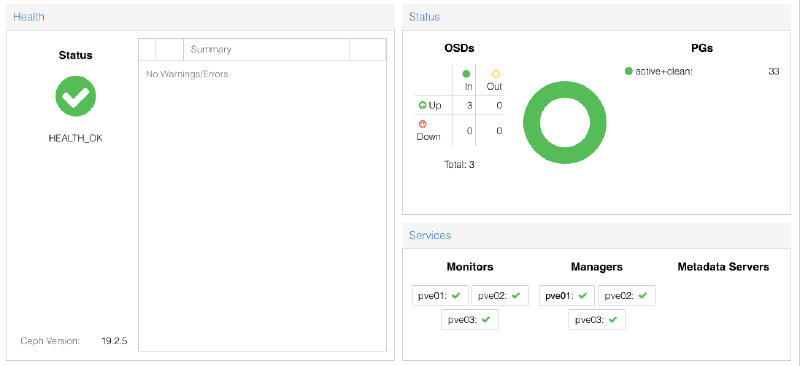
PVE-NFS onto ceph-vm and deliberately stress-tested the cluster under real I/O load rather than just letting it sit at idle, which turned into its own re-benchmark of the fabric. Sustained multi-gigabyte-per-second I/O across all three nodes for the length of that benchmark produced zero recurrence of the fault, a real burn-in test. I’m treating all of that as a genuine improvement, still not a full resolution. The research above is clear that this exact bug does not always stay fixed with kernel parameters alone, and two of three drives faulting in 48 hours is not a reassuring sample size, but every day and every workload it survives without recurring adds real confidence.
If it recurs, the next step is a BIOS-level PCIe power-saving setting rather than another kernel parameter, since at least one community case needed exactly that to actually stop the fault. I haven’t confirmed the exact menu path on this hardware yet, that needs console access I haven’t had a reason to use since the original build. If it recurs even after that, I might have to replace the drives altogether, and eat the cost and hassle of that on top of everything already spent diagnosing and fixing this, three more 2TB NVMe drives at whatever storage happens to cost this month. That’s a worse outcome than I’d like, but it’s the honest one given what the failure history actually looks like so far.
The alerting gap is closed for good regardless of how the drive situation resolves, and that alone was worth some hours over a weekend.