It started with an old IKEA BILRESA scroll wheel, paired with Home Assistant over Thread a while back but never assigned to any automation. Because nothing was actually watching it, there was no way to notice when it quietly dropped off the Thread mesh, no automation failed to fire, no state failed to update, since neither existed in the first place.
I only found out when a new IKEA BILRESA dual button refused to commission (why I got a second one when the first one wasn’t in use is a different question completely). Home Assistant found it immediately every time, discovery over mDNS just worked, but pairing never got past the initial handshake. I checked what else was actually online and found the scroll wheel had been dead the whole time too. Two Thread devices, two different failure modes, on the same network at the same time.
I’ll say upfront that I’m not an IPv6 expert, not even close. Going in, my working knowledge was surface level at best. That gap led me into a real rabbit hole and more than one wrong turn happened before any of it actually made sense.
Both problems traced back to the same VLAN boundary, and fixing them properly took two separate rounds on the UniFi side.
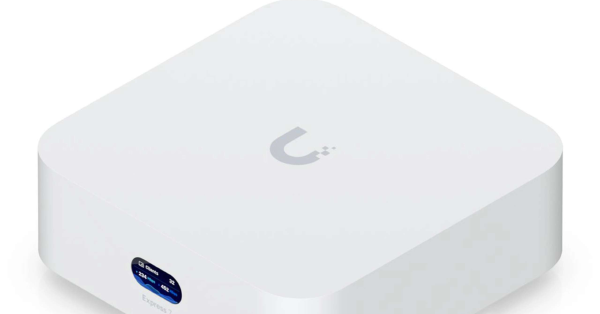
Home Assistant runs as a VM on one VLAN. The Thread border routers, a handful of Apple TVs, live on another VLAN entirely, reached only through the UniFi gateway. That’s the segmentation from How I GitOps’ed My Homelab and moving onto the UniFi Express 7, and this is not what Thread expects at all.
No tagged VLAN had IPv6 at all#
Every tagged VLAN created during that segmentation work had IPv6 completely unconfigured, no interface type set, no prefix delegation turned on. After all, who needs IPv6 in their home network anyway? Only the default network had it, and I don’t even remember setting it up there to begin with. It simply never mattered (pun intended) until something IPv6-dependent landed on one of those VLANs.
Thread end devices are IPv6 only, there’s no IPv4 fallback anywhere in the protocol for an actual mesh node. Home Assistant’s matter-server could still discover a Thread device over mDNS, which works fine over IPv4, but it could never connect to one. The log said as much:
[network-unreachable] send ENETUNREACH fdbf:1cc1:80a0:0:9cba:93cd:9416:d6a5:5540ENETUNREACH comes from the local network stack before a packet ever leaves the machine, the OS itself reporting that it has no route to that address family at all. A firewall drop looks different, it times out or resets instead. Discovery had already succeeded by the time this error fired, so mDNS had done its job. This was the connection attempt itself failing.
I enabled IPv6 on the VLAN using a self-generated static Unique Local Address (ULA) prefix, router advertisements on, Stateless Address Autoconfiguration (SLAAC) for client addressing. Every VLAN that needs IPv6 on this network runs off the same /48, each one configured in UniFi as its own /64 subnet, matched to the VLAN’s own ID for readability. I generated that /48 once with unique-local-ipv6.com, an RFC 4193 generator that produces a prefix that’s globally unique without any central authority handing it out.
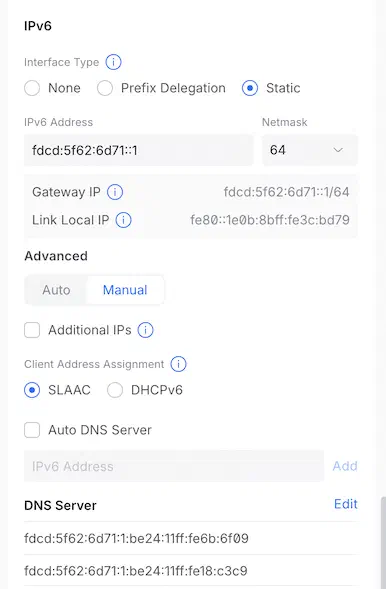
UniFi has no concept of the /48 at all. Per network, UniFi’s own netmask range only goes from /64 down to /127, never larger than /64, and the /48 is purely a convention I keep by hand, picking each VLAN’s /64 to share the same first three groups. That matches what RFC 4193 actually specifies. A ULA splits into a 48-bit site prefix, the fd00::/8 range plus a 40-bit random Global ID, and a 16-bit Subnet ID left for the owner to assign, so one /48 yields up to 65,536 possible /64 subnets. A /64 alone is just one of those subnets, enough for a single VLAN with nothing left over if another one ever needs its own.
For a site prefix like fdcd:5f62:6d71::/48, the actual prefix from the screenshot, VLAN 42 gets fdcd:5f62:6d71:42::/64, the same /48 with just the last group swapped for the VLAN’s own ID.
I chose static ULA over a delegated prefix from the ISP because nothing on these VLANs needs to be reachable from the internet, and a self-generated prefix never changes regardless of what the ISP does upstream. My ISP only hands out a /64 via prefix delegation anyway, which would have left me in the exact same subnetting bind as before, one subnet’s worth of space, nothing left over to split across multiple VLANs.
That fixed the already-paired device. The VM picked up a real IPv6 address on the same ULA prefix as the rest of the network, just a different subnet ID for its VLAN, and it reconnected on its own.
The two devices behaved differently because they take different paths back onto the network. The already-paired device reconnects through a cached session relayed over the border router’s own IPv4 address, a proxy sitting in front of the actual Thread mesh rather than the raw mesh itself, so IPv4 there is just a normal connection to a dual-stack host, nothing to do with Thread’s own addressing. That path had failed before the IPv6 fix too, most likely because the runtime tries IPv4 and IPv6 in parallel when connecting to a dual-stack host, and with IPv6 completely absent rather than just unreachable, that parallel attempt got confused and failed outright instead of settling on the IPv4 leg that should have worked fine on its own. Fresh commissioning has no cached session to lean on. The border router only proxies an already-established session, so the initial unauthenticated pairing handshake has to reach the Thread mesh’s own address directly, the raw mesh, IPv6 only, no IPv4 option at all, which is exactly what IPv6-on-the-VLAN didn’t provide.
Thread’s own address space was never routed#
New-device commissioning still failed, same shape every time, a different specific address, always inside the same /64:
Operational address for undefined set to udp://[fdbf:1cc1:80a0:0:...]:5540
... unreachable for known-address-0-...
fdbf:1cc1:80a0::/64 is a ULA, and specifically it’s the Thread network’s own OMR (Off-Mesh Routable) prefix, generated and advertised by the border router for its mesh. It has nothing to do with the VLANs’ own ULA addressing from the first fix, it’s a separate, self-contained address space that exists only because Thread needs one.
Home Assistant’s own routing table backed this up. Only a default route existed, nothing prefix-specific. Traffic fell through to that default route, hit the gateway, and the gateway had no idea what to do with it. A router doesn’t learn a route just because some device on the LAN sends out a router advertisement for it. Those are link-local multicast, and that never crosses a VLAN boundary, no matter how capable the router in between is. This is why Matter and Thread setups are usually told to keep the controller and the border routers on one segment.
Moving Home Assistant onto that segment wasn’t on the table, so the fix was a static IPv6 route added directly on the gateway:
- Destination:
fdbf:1cc1:80a0::/64, the Thread mesh’s OMR prefix - Next hop: the active border router’s own link-local address, bound explicitly to its own interface. A link-local address is tied only to the interface itself, not to any prefix, which makes it the most stable next-hop choice available for a route like this.
graph LR
    ha["Home Assistant VM
 one VLAN"]
    gw["UniFi gateway"]
    br["Border Router (Apple TV)
 another VLAN"]
    thread["Thread mesh
 fdbf:1cc1:80a0::/64"]

    ha -->|"default route"| gw
    gw -->|"static route, added by hand"| br
    br --> thread
With that route in place, the new device commissioned right after, and both problems have stayed fixed since.
What might break this route going forward#
Two things can silently invalidate the static OMR route above, and neither shows up anywhere in the UniFi UI when it happens. Apple’s and Google’s Thread implementations both support multiple redundant border routers for one mesh, here several Apple TVs, and only one is active at a time. A route pinned to today’s active router’s address breaks the moment a different one takes over. The OMR prefix itself can also regenerate, which leaves the destination half of the route stale too.
Both are inherent to how Thread’s redundant-border-router model works, nothing that I configure can make that problem go away, at least not as far as I’ve been able to figure out. The link-local next hop at least keeps the route immune to any addressing change elsewhere on the network. If Matter or Thread breaks again here, checking this route first, does it still point at the currently active border router, on the currently active prefix, beats a full re-diagnosis from scratch.
What I ruled out, and why#
Moving Home Assistant onto the border routers’ own VLAN removes the whole routing problem outright, and I ruled it out anyway. The segmentation was the point.
A second NIC on the Home Assistant VM, bridged onto that VLAN while keeping its primary identity elsewhere, got ruled out for the same reason.
A route added by SSHing directly into the gateway, bypassing the controller’s own configuration system, was technically possible and deliberately avoided. Anything set outside it tends not to survive a reboot or firmware update, and disappears with nothing marking why.
Giving Home Assistant its own Thread radio, so it runs an independent mesh instead of depending on Apple’s or Google’s border routers, is the more durable fix long term. I already have a SMLIGHT SLZB-MRW10 that could theoretically do this, but Zigbee and Thread share the same radio on that device, so running one means giving up the other, and using it here means giving up Zigbee, where I have close to 100 devices already, and that’s not happening soon. I might add a new dedicated Thread border router at some point, if this turns into a problem.
I didn’t expect IPv6 to break Pi-hole too#
I noticed this one myself, not from a log. My phone started showing ads I wasn’t used to seeing, right around the same time local clients on the network started actually picking up real IPv6 addresses of their own. IPv4 clients get Pi-hole’s address pushed via DHCP. IPv6 has no equivalent if Pi-hole has no IPv6 address of its own, and once a VLAN has IPv6 on, clients pick up an IPv6 DNS server via router advertisement anyway, defaulting to the gateway, whose upstream DNS was set to “auto” and resolved to the ISP instead of Pi-hole. The moment a client picked up an IPv6 address, its DNS queries had a path that skipped Pi-hole completely, ads and all, and nothing about the client’s own configuration looked wrong.
It wasn’t just ad blocking either. Local hostnames stopped resolving too, since those same queries never touched CoreDNS or Knot, the resolvers actually serving my own zones, on their way straight to the ISP instead. That layered resolver setup, and what it looks like when it breaks, is covered in Managing Hosts and Zones in My Homelab’s DNS.
Per VLAN on the UniFi side, I gave Pi-hole a static ULA address of its own, pointed each VLAN’s DHCPv6 DNS setting at it instead of “auto,” and used each host’s stable 64-bit Extended Unique Identifier (EUI-64) address rather than its DHCPv6-leased one for anything hardcoded elsewhere. This whole rabbit hole also meant giving both CoreDNS servers, plus their Keepalived VIP, IPv6 addresses of their own, not just Pi-hole, since CoreDNS is the resolver actually answering for my own zones. Not every VLAN needed this, only the ones with real browsing devices on them. The fuller DNS design behind Pi-hole, CoreDNS, and Knot on this network is its own post: How DNS and Caddy Work in My Homelab.
IPv4 filtering being airtight tells you nothing about IPv6. If your filtering DNS server has no IPv6 address, enabling IPv6 anywhere opens a silent bypass, with no error and no symptom beyond filtering quietly not applying to whichever client just got an IPv6 address.
The bigger picture#
None of this was ever really a UniFi misconfiguration. Thread’s own design assumes the controller and its border routers live on one flat broadcast domain. A border router announces its OMR prefix through router advertisements, and anything sharing that broadcast domain picks up the route automatically, no manual config needed. That mechanism only works inside a single VLAN, by design, which is why virtually all Matter and Thread vendor documentation just says to put everything on one network. The protocol was never built with segmentation in mind at all.
That leaves a three-way tradeoff, and every fix in this post picks a corner of it. Give up some isolation and put a border router directly on the controller’s own VLAN, which removes the routing problem instead of managing it, at the cost of one more device on a segment meant to stay minimal. Keep the segmentation and accept the maintenance, a static route that needs checking whenever the active border router changes or the mesh regenerates its own address space, which is the option taken here. Or loosen the segmentation itself and put Home Assistant on the same VLAN as the rest of the smart home gear, ruled out immediately since keeping it off that VLAN was the entire point.
Both root causes above, the missing VLAN IPv6 and the unrouted OMR prefix, were consequences of picking the middle option and then finding out, one piece at a time, everything that has to stay true for it to keep working. The Pi-hole bypass is a separate story, a DNS setting stuck on auto, unrelated to Thread’s design.
Maybe Zigbee had this right all along#
All of this made me reconsider Zigbee. My coordinator is a network-attached SMLIGHT SLZB-MRW10, not a USB dongle plugged into a host, and even connected that way, none of it touches routing or IPv6 in any way. Zigbee2MQTT just opens a plain TCP connection to the coordinator’s IPv4 address, and that’s the entire network layer involved. No border router, no OMR prefix, no static route to babysit.
Thread’s IPv6-native design is the whole point of it. A Thread device is a genuine peer on the network, not something hiding behind a hub’s translation layer. But that same design is exactly what turned two VLANs into two rounds of gateway configuration, plus a DNS bypass on the side. Zigbee just doesn’t have that problem in the first place. The mesh itself doesn’t route, doesn’t need an address space of its own to be reachable from elsewhere, and doesn’t care what VLAN the coordinator happens to sit on. And since it’s completely isolated and non-IP based, it feels more secure too.
I’m not giving up on Thread. The cross-vendor interoperability it offers over Zigbee is real, and Matter support keeps growing. But after all this, Zigbee’s simplicity reads less like a limitation and more like a feature. For now, if I have a choice between a Zigbee and a Thread device that both offer the same features, I’ll be grabbing the Zigbee one for sure.