Three identical nodes, one VF in use#
My three-node Proxmox VE cluster runs on identical hardware: three ASUS NUC 15 Pro units, each with the same Intel Arrow Lake-P iGPU, PCI ID 8086:7d51. I covered the SR-IOV (Single Root I/O Virtualization) setup itself in Intel Arc SR-IOV Hardware Transcoding with Plex on Proxmox VE: each node splits its GPU into seven virtual functions, and Plex uses one of them, 0000:00:02.2, for hardware transcoding.
All three nodes have SR-IOV enabled at the host level with sriov_numvfs=7, confirmed identical PCI IDs and IOMMU groups across all three. Only one node was using a VF. The other two sat there configured and idle for months.
Building a second passthrough VM#
A new workload on the cluster needed real hardware video transcoding of its own, so I built a second GPU-passthrough VM. I assigned it two VFs by raw PCI address, 0000:00:02.1 and 0000:00:02.2, planning to split transcoding work across both rather than come back and build a second VM later. Inside the VM, each VF shows up as its own /dev/dri/renderDxxx node, so the containers doing the transcoding mount one each with --device, keeping them cleanly isolated from each other on the same guest.
What happens if this VM migrates onto Plex’s node#
The new VM and Plex were running on different nodes. Migrate the new VM, powered off, onto Plex’s node, though, and it would fight Plex for the exact same physical device.
A hostpciN entry like 0000:00:02.X in a VM config means slot 2, function X, on whatever node this VM happens to run on: a node-local address, rather than a pointer to one specific physical device. On a cluster where every node has identical hardware, that address resolves to a real, working device on every single node. The VM always gets its configured slot; it’s just that which physical VF sits behind that slot depends on which node it lands on, and it only collides with another VM if the two of them land on the same node while referencing the same raw address.
That’s precisely what I’d set up: the new VM’s second VF, .2, was the same raw address Plex already used on its own node. Why past me picked .2 as Plex’s VF in the first place, instead of starting at .0 or .1, is anyone’s guess. Past me clearly wasn’t thinking this far ahead.
PCI Resource Mappings#
Proxmox VE has a feature built for managing this: PCI Resource Mappings, under Datacenter → Resource Mappings. A mapping is a named logical device that resolves to a per-node physical PCI address. The VM config references the mapping name, not the address, and Proxmox VE resolves it to whatever address is correct for the node the VM is running on.
I created three mappings, one per logical consumer, each pinned to a different, non-overlapping VF slot, replicated identically across all three nodes. The GUI, under Datacenter → Resource Mappings → Add, is the easier way to do this: it picks up the IOMMU group and subsystem ID for you automatically. The same thing on the CLI, repeating --map once per node, looks like this:
pvesh create /cluster/mapping/pci --id arc-vf-app2 \
  --map node=pve1,path=0000:00:02.1,id=8086:7d51,iommugroup=14,subsystem-id=8086:1234 \
  --map node=pve2,path=0000:00:02.1,id=8086:7d51,iommugroup=14,subsystem-id=8086:1234 \
  --map node=pve3,path=0000:00:02.1,id=8086:7d51,iommugroup=14,subsystem-id=8086:1234
The other two mappings follow the same shape, just with a different --id, path, and slot.
| Mapping | VF slot (every node) | Consumer |
|---|---|---|
arc-vf-app2 | .1 | the new transcoding VM, first VF |
arc-vf-plex | .2 | Plex |
arc-vf-app3 | .3 | the new transcoding VM, second VF |
graph LR
    m1["arc-vf-app2
 VF .1 on every node"] --> vm["New transcoding VM"]
    m2["arc-vf-plex
 VF .2 on every node"] --> plex["Plex"]
    m3["arc-vf-app3
 VF .3 on every node"] --> vm

    classDef vf1 fill:#2563eb,fill-opacity:0.18,stroke:#2563eb,stroke-width:1px
    classDef vf2 fill:#16a34a,fill-opacity:0.18,stroke:#16a34a,stroke-width:1px
    classDef vf3 fill:#d97706,fill-opacity:0.18,stroke:#d97706,stroke-width:1px
    class m1 vf1
    class m2 vf2
    class m3 vf3
That third mapping’s slot is worth a second look: it’s .3, not .2. The new VM’s second VF started out on .2 too, the same slot as Plex, which is the near-miss that kicked off this whole post. Moving it to .3 means none of the three mappings share a slot, no matter which node any of them lands on.
With the mappings created, each VM’s PCI passthrough lines change from raw addresses to mapping references:
| Raw PCI address (every node) | Mapping name |
|---|---|
0000:00:02.1 | arc-vf-app2 |
0000:00:02.2 | arc-vf-plex |
0000:00:02.3 | arc-vf-app3 |
hostpci0: mapping=arc-vf-app2,pcie=1Now any of these VMs can move, albeit offline, to any of the three nodes without colliding with another one. The mapping layer makes the addressing portable. It does nothing for live migration; that limitation is a separate, still-unsolved problem on this hardware, and the mapping was never meant to touch it.
One trade-off, and it only applies to slots that are mapped: a mapping fixes a name to the same slot index on every node, so once a slot is mapped you give up using it independently per node, even for a VM or container that doesn’t need migration at all. The four VF slots I haven’t mapped stay node-local, free for anything that doesn’t care about cross-node portability. Map all seven, though, and the cluster’s 3 × 7 independently-addressable VFs collapse into a single shared pool of 7 logical identities, each pinned to the same slot everywhere. The portability is real, but it costs the per-node flexibility of assigning that slot independently, which is worth remembering before mapping every VF just because the option exists.
Gotchas while building it#
Creating a mapping doesn’t validate it. Starting a VM against it does. pvesh create /cluster/mapping/pci happily accepts an incomplete map entry. I hit this twice: once with a map missing iommugroup, and separately one missing subsystem-id. Both looked fine at creation time. Both only failed later, at qm start, with:
PCI device mapping invalid (hardware probably changed):
missing expected property 'X'
A working map entry needs all five of these present:
node=the node this entry applies topath=the PCI address on that node, e.g.0000:00:02.2id=the vendor:device ID,8086:7d51for this GPUiommugroup=read from/sys/bus/pci/devices/<addr>/iommu_groupsubsystem-id=built from/sys/bus/pci/devices/<addr>/subsystem_vendorand/sys/bus/pci/devices/<addr>/subsystem_device
Check all five are in the map entry before moving on, since the create call itself won’t tell you if one is missing.
--live-migration-capable is a real flag on mappings, and I left it off on purpose. It exists to let a VM with a mapped PCI device live-migrate with the device still attached. Making that work requires vendor driver support for VFIO device-state migration, which Proxmox VE’s own docs currently only confirm for NVIDIA. The community i915-sriov-dkms patch that makes SR-IOV work on this Arc iGPU in the first place doesn’t provide it. Setting the flag without that underlying driver support wouldn’t produce a working live migration. It would let Proxmox VE attempt one anyway, and fail, or leave the VF in a bad state. The mapping fixes the addressing collision, nothing more. I didn’t want a flag in the config implying it covers live migration too, when that support isn’t there.Retrofitting Plex onto the mapping#
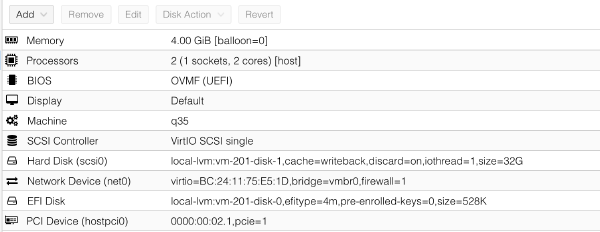
The real test was moving Plex itself onto its new mapping without touching the underlying hardware at all. On Plex’s VM, under Hardware → PCI Device, editing the existing entry and switching it from a raw device to the new mapping changed its passthrough line from a raw address to the mapping name:
hostpci0: mapping=arc-vf-plex,pcie=1Same physical VF, .2, on the node Plex already runs on, just referenced by name instead of address now. Reverting, if anything had gone sideways, was just as simple: put the raw address back.
hostpci0: 0000:00:02.2,pcie=1After restarting the VM, vainfo inside it came back identical to before, full VAAPI pipeline, same codec support. The real proof came from watching Plex itself: an active transcode session in the Plex dashboard, tagged (hw), confirming genuine hardware-accelerated work running end to end through the new mapping.
Where this leaves HA#
Putting a VM with a passed-through GPU into HA (High Availability) doesn’t strictly need a mapping. Manually picking non-colliding raw addresses would have worked just as well, in theory. What the mapping buys is that guarantee enforced by Proxmox VE itself, not by me keeping track of which address is already spoken for. Both VMs have that now, so a node affinity rule can go in for either one without relying on my own bookkeeping staying correct.